Several players build in one shared world, each in their own game.
Version 0.2.5 · Windows and Steam · source available (PolyForm Noncommercial) · unofficial · Last updated 2026-10-23
FeverLink3 is in beta: keep backups of the saves you play with.
Quick start · Download · Playing guide · FAQ · Status · Changelog · Source on GitHub
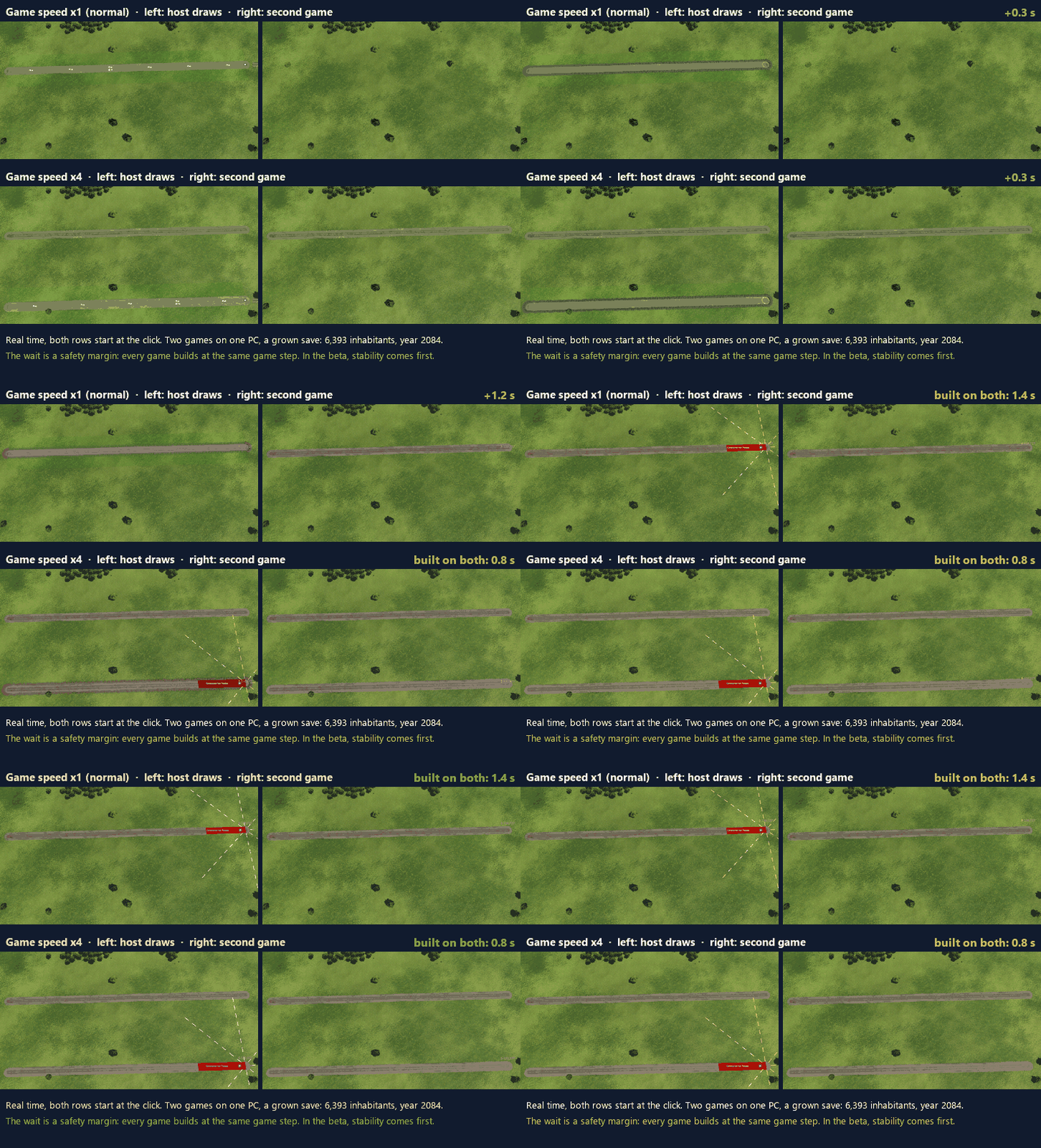
Real time: the road stands on both games 1.4 s after the click at game speed x1 (normal) and 0.8 s at x4 (two games on one PC, a grown save with 6,393 inhabitants). The wait is a safety margin: every game builds at the same game step. In the beta, stability comes first.
What you get
- Built into the game. No separate launcher or program to run: start Transport Fever 3 from Steam as usual. Host, join, chat, sync and updates all live in the game’s bottom bar and window.
- Build together. Roads, rail, stations, stops, depots, lines and vehicles: what one player builds appears in every game.
- Your other mods work together too. Mods that change your world by themselves, such as Auto Line Namer, Auto Color Lines or Auto Assign Terminals, stay in sync: the host’s copy makes the change and every game applies it at the same moment, and what you set in such a mod’s own window reaches every game (new in 0.2.4; seen with two games on one PC).
- The full game. Towns grow, traffic flows, ratings change, exactly as in single player. Nothing is switched off.
- Easy to join. Over Steam: no ports, no router settings, no IP addresses. The host sends a join code, the friend pastes it.
- Steam invites. Invite friends from Steam’s own invite dialog; with a world loaded they join by themselves (played between two PCs over the internet).
- Always the same world. The games check each other all the time. If they ever drift apart, everyone gets the host’s world back in a few seconds and play goes on.
- Shared speed, pause and chat.
- Encrypted. Everything between the games is encrypted; the join code works like a password.
- One-click bug reports. “Report a problem” collects the logs of every player in the session into one zip, with personal data removed.
- Updates by itself. New versions arrive automatically from the official GitHub releases.
The interface
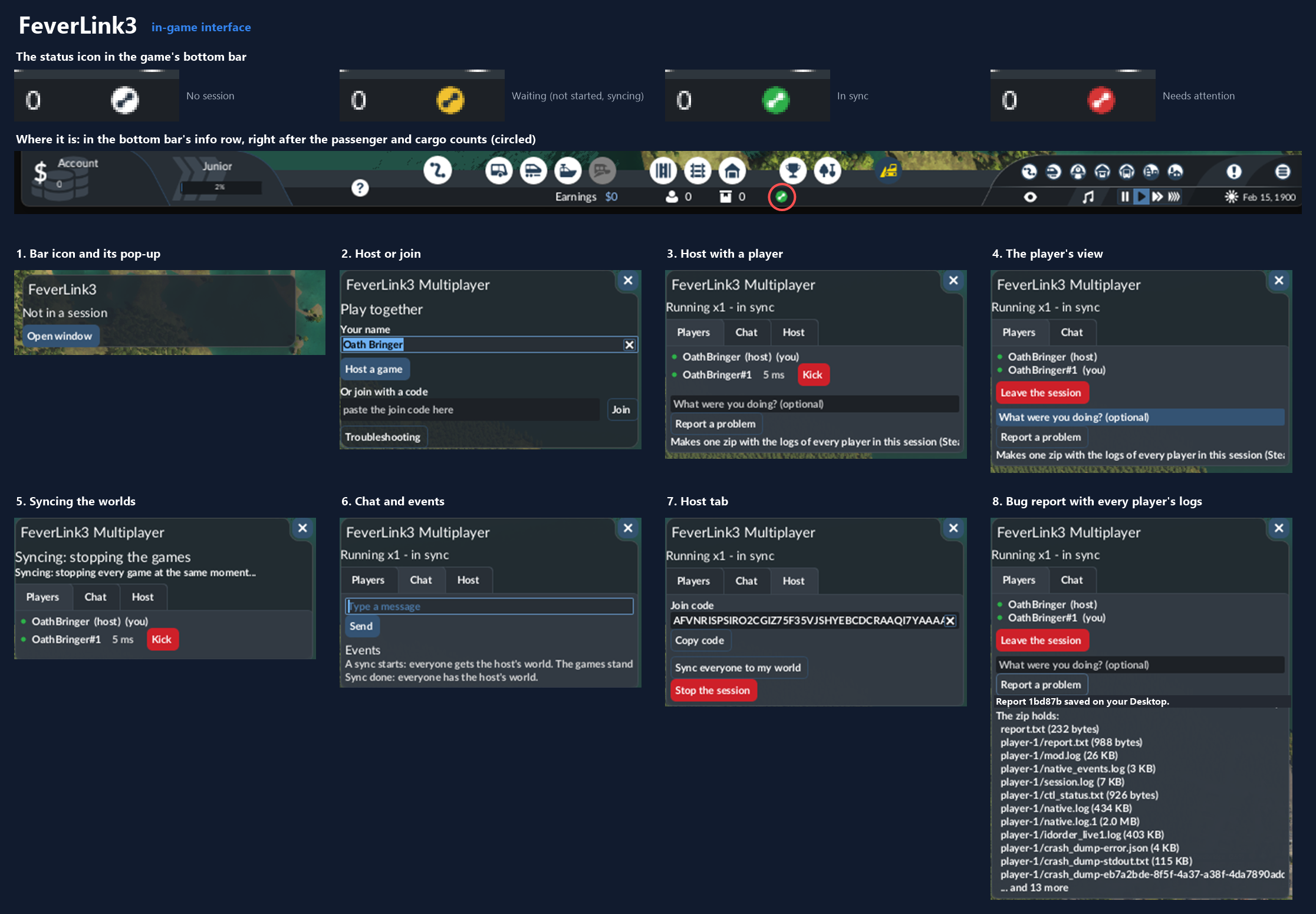
A coloured icon in the game’s bottom bar shows the session at a glance: white (no session), yellow (waiting), green (in sync), red (needs attention). Click it for the details.
Quick start
- Download
FeverLink3-0.2.5.zipfrom GitHub Releases or Nexus Mods and extract it. - Close the game. In Steam, right-click Transport Fever 3 → Manage → Browse local files.
- Copy
winhttp.dlland themodsfolder into that folder (merge the folders when Windows asks). - Start the game from Steam, and turn on FeverLink3 Multiplayer in the mod list when you start or load a game.
- Host: click the FeverLink3 icon in the bottom bar → Host a game → Copy code and send it to your friend → Start the session when they appear. Join: open the FeverLink3 window, paste the code (
Ctrl+V) and press Join. Only join people you trust.
Every player installs FeverLink3 and needs the same game version. After this first install, updates arrive automatically. More in the playing guide.
Uninstall: close the game and delete winhttp.dll and the folder mods\release\feverlink3 from the game’s folder.
Download
The newest version is always at github.com/AZalshehri7/FeverLink3/releases/latest. Each release has one zip, its .sha256 file and a manifest.json, so you can check what you downloaded: see Security for players. The files are not code-signed yet (planned for 1.0.0), so Windows or your antivirus may warn about the new file.
More
- Playing guide: install, host, join, and what to do when something goes wrong
- FAQ
- Status: what has been seen working in the real game, and what not yet
- Changelog
- Roadmap
- Privacy
- Security for players: what is in
winhttp.dlland how to check it - How builds sync
Credits
FeverLink3 builds on what earlier Transport Fever multiplayer projects found and documented; their licences are in THIRD_PARTY_NOTICES.md. It uses the game’s official scripting API as described in the Transport Fever 3 modding wiki and the TF3 docs.
Contact
Bugs and requests: GitHub issues (use Report a problem in the game to make the zip). Discord: azalshehri.
Licence
PolyForm Noncommercial 1.0.0: free to use, study, change and share for noncommercial purposes. For commercial use, ask on Discord.
FeverLink3 is an unofficial fan project for Transport Fever 3 (Windows, Steam). It is not affiliated with or endorsed by Urban Games or Paradox Interactive.